


GPS Speedometer & Odometer
4.71.94K Reviews
App Specs
- Version
- 1.2.2
- Updated On
- License
- Free
- Downloads
- 5,000,000+
- Developer
- QR & Barcode Scanner
- Categories
- Maps & Navigation
- Platform
- Android, iOS
Screenshots
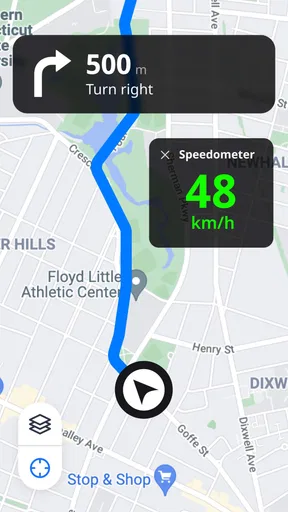
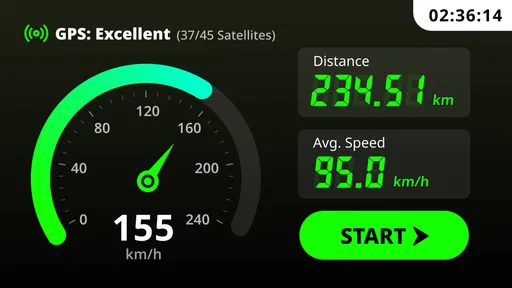
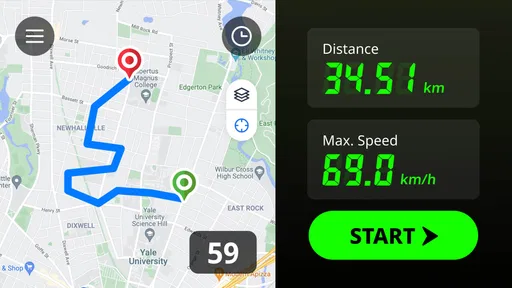
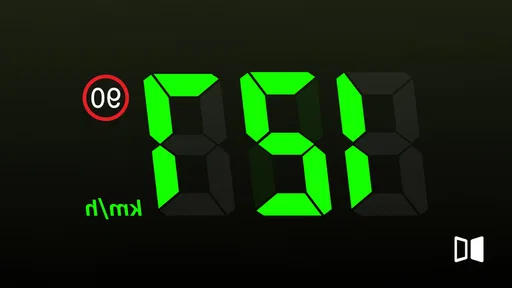
 Analysis by AppCompare
During the first few outings, a phone-based speed display can feel like a small upgrade with a surprisingly satisfying payoff. I like being able to check speed and distance on a screen I already carry, rather than treating every trip as a chance to install another dedicated gadget. The useful question, though, is whether that convenience still matters once the novelty wears off. For me, GPS Speedometer & Odometer makes the most sense when I have a specific reason to monitor a journey, not as a dashboard I need to keep open every day.
Why it catches your attention in the first week
The appeal is immediate: open the app, glance at the speed readout, and get a simple extra reference for a drive, ride, or other trip. That directness is valuable when a vehicle’s built-in display is hard to read, unavailable, or not relevant to the activity. I would treat the phone display as a companion instrument, however, rather than a replacement for the vehicle’s own speedometer or a reason to look away from the road.
Its audience is broader than people who enjoy collecting speed figures. A cyclist can use a phone mounted securely on the handlebars to check pace and trip distance; someone borrowing a vehicle can get a separate readout without changing the vehicle; and a passenger can monitor a route while the driver stays focused. For a first outing, I’d keep the phone stable, set the display before moving, and avoid fiddling with settings once underway. A quick glance is useful; operating a phone in traffic is not.
When it earns a place in a routine
The app is more likely to remain useful if it supports a recurring habit. A rider who tracks familiar weekend loops, for example, may find the trip meter handy for comparing how far each route goes. Someone who drives different vehicles might value having the same general reference available across trips. The odometer and trip meter serve different purposes: one gives an overall distance reference, while the other lets you follow a single outing without folding it into that broader total.
That distinction also suggests a practical routine: reset or check the trip reading before setting off, then review it after stopping rather than trying to interpret several figures on the move. It helps keep the app focused on the question that matters for that journey—how far this particular trip covered—rather than turning every outing into an unnecessary stream of numbers.
GPS readings need sensible expectations
A GPS-based readout is not the same as a dedicated instrument wired into a vehicle. Its usefulness depends on the phone receiving a suitable location signal, and the display can be less dependable when reception is poor or the device has not settled into a good fix. I’d give it a moment before setting off and use it as a useful estimate, not as a precise authority for every situation. If a speed limit matters, follow the posted signs and the vehicle’s own instruments rather than relying on an app alert alone.
There is a trade-off with leaving it active in the background, too. That can be convenient when you need to use another app during a trip, but GPS use over a long outing can consume battery. I’d start with a well-charged phone, keep a charger available for extended journeys, and avoid leaving tracking running after the trip is over. Those small habits matter more to long-term satisfaction than changing the screen’s appearance.
Worth Reading Before You Choose

Flipboard Shows What News Apps Must Do Beyond the Feed

Switching to Android Auto Means Rethinking Your Driving Routine

Google Calendar Makes a Crowded Week Easier to Manage

Ludo King Makes the Most of the Minutes Between Plans

Baby Panda World Brings Quick Play to Modern Phones, but Its Game Library Feels Busy

ESPN’s Live Game View Makes Following Close Games Easier
Who should choose another option
If you want turn-by-turn directions, route planning, live traffic information, or a dedicated cycling computer’s broader ride tools, a navigation app or purpose-built device is a better fit. This app’s appeal is narrower: it offers a speed-and-distance reference rather than replacing a full navigation setup. Drivers who already have a clear, dependable dashboard may not need another display, and anyone who dislikes mounting a phone or monitoring battery use may find the convenience too modest to justify regular use.
It is also worth separating a speed alert from a guarantee of safe or legal driving. An alert can serve as a reminder, but it cannot account for every road condition or replace attention to signs and traffic. I see that setting as a personal prompt, not a substitute for judgement. If a second screen would distract you, leaving the phone put away is the better choice.
A Handy Tool for Speed Enthusiasts
Let me start by saying that the GPS Speedometer & Odometer is more than just a speedometer. It’s like having your own personal dashboard right on your smartphone. The app is available for both Android and iOS, and setting it up was a breeze. I downloaded it from the app store, and within minutes, I was ready to hit the road.
As a Maps & Navigation app, it has a focused job rather than the broad role of a full navigation suite. It is free to download, with optional in-app purchases listed from $4.49 to $39.99 per item. The app is rated for Everyone, and its developer is QR & Barcode Scanner. Its 4.7 average from around 19,000 ratings, roughly 900 written reviews, and over a million installs suggest that many people find the basic idea useful, though those figures cannot tell you whether it suits your particular phone, vehicle, or routine.
Design and User Interface
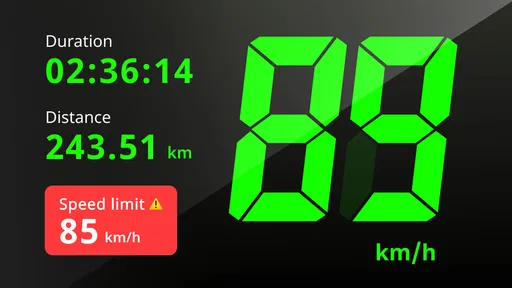
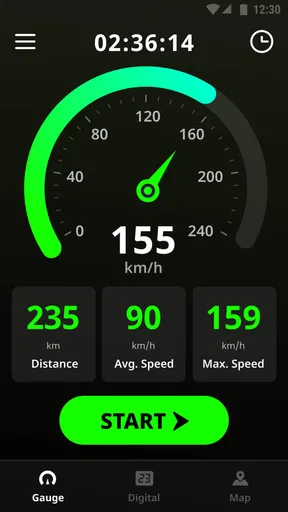
The app boasts a sleek and minimalist design which I absolutely love. It's straightforward, and the interface is easy to navigate. Whether you're tech-savvy or not, you'll find it user-friendly. The main screen displays your current speed prominently, which is great when you’re on the move and need a quick glance without distractions. There are also options to switch between digital and analog displays, which is a nice touch for those who have a preference.
That prominent readout is most helpful when the phone is mounted securely and positioned within a brief glance, not held in your hand. I’d choose a mount before depending on the screen during a ride, and I would set the display while stationary. The analog option is a matter of preference; a digital number may be quicker to read at a glance, while a dial can feel familiar if you are used to a traditional speedometer. Neither choice changes the need to keep your attention on the road.
Features That Stand Out
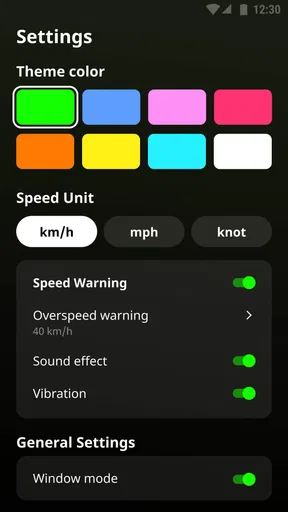
One of the standout features for me was the ability to measure speed in different units. Whether you prefer kilometers per hour, miles per hour, or even knots for you sailors out there, the app has got you covered. Plus, there's an odometer feature that tracks your total distance traveled, which is super handy for long road trips or cycling adventures.
Unit choice is more than cosmetic when you switch between activities or travel somewhere that uses a different convention. I’d set the unit before starting rather than trying to make sense of a changing display mid-trip. For a cycling loop, distance can be the more useful figure; on a drive, speed may be the immediate reference. Keeping the task simple helps the app feel like a practical instrument rather than another screen demanding attention.
The app also includes a trip meter. I found this perfect for tracking shorter distances without affecting the overall odometer reading. If you’re like me and love knowing all the stats, this is a feature you’ll appreciate.
A realistic example is a weekend ride on a route you do not take often: I’d note the trip distance after reaching a safe stopping point, then use that figure to remember the length of the outing without confusing it with an ongoing total. The same separation is useful for a driver making several stops on one day. The key is to decide beforehand which reading you want to follow, since distance records are only useful when you know what they represent.
Real-Time GPS Tracking
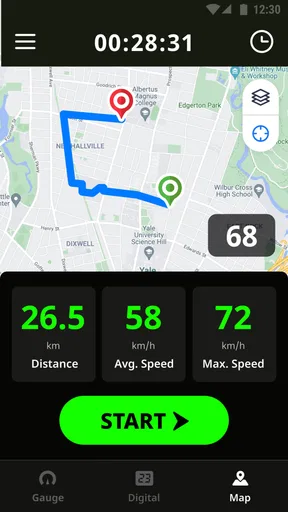
One of my favorite aspects of this app is the real-time GPS tracking. With precise location tracking, the app accurately gauges your speed and distance traveled. It even works in the background, so you can use other apps without losing your speed data. Just a heads up though, prolonged use of GPS can drain your battery, so keep a charger handy if you're planning a long journey.
In ordinary use, I would give the phone a little time to establish its location before treating the figures as meaningful. A tunnel, dense surroundings, or a weak signal can make a GPS reading less useful, so I would not judge a route—or a vehicle’s equipment—by a brief fluctuation on the screen. The app is best viewed as an independent reference for a trip, not as a certified measurement tool or a replacement for the instruments used for safety-critical decisions.
Customizable Alerts and Settings
Safety first, right? The app allows you to set speed alerts to notify you when you’re going over a certain limit. I found this feature particularly useful while driving in speed-controlled zones. You can also customize the app’s theme and color scheme to suit your taste, which is a nice little personal touch.
I’d set an alert only when I have a clear reason to use one, and I would still check road signs because limits change with location and conditions. A notification is a reminder, not proof that the chosen threshold is appropriate for the road ahead. Theme choices can make the screen more comfortable to look at, but I would favor easy readability over decoration, particularly if the phone is mounted in bright daylight.
Performance and Compatibility
In terms of performance, the app has been pretty solid. It runs smoothly without any noticeable lag. It’s compatible with most devices, and I didn’t experience any crashes. I did notice that it requires a stable GPS connection to function optimally, so make sure your device’s location services are enabled.
The current version is 1.1.9, and it supports devices running Android 7.0 or later. That gives many Android users a straightforward starting point for checking compatibility, while iOS users can look for the app through their usual app store. I’d also test the display and GPS reception while parked before relying on them for a journey. A quick check can reveal whether the phone mount, screen visibility, and location signal work well together in your own setup.
Keeping the app useful without making it a chore
For lasting value, I’d use it selectively rather than leave it running whenever I travel. A short check before a familiar commute may not add much if the vehicle already gives a clear speed reading. A longer bike ride, a borrowed vehicle, or a trip where I want a separate distance reference gives it a clearer purpose. This kind of selective use also limits unnecessary battery drain and reduces the temptation to watch the screen instead of the surroundings.
There is little reason to make routine maintenance complicated. I’d keep the app updated through the store, check that the phone’s location services are available before setting off, and close or stop using it when the trip is finished. If you are weighing an optional purchase, first spend time with the free version and decide whether the app has become part of a real habit; the listed purchase range alone does not tell you which paid option, if any, would matter to your use.
Final Thoughts
All in all, the GPS Speedometer & Odometer app delivers on its promises. It’s a versatile tool for anyone who loves tracking their speed and distance, whether you’re on the road, cycling, or even sailing. Its user-friendly interface and customizable features make it a joy to use. While the battery usage is something to keep in mind, the app’s benefits definitely outweigh this slight drawback.
My longer-term take is more measured: it earns space on my phone when I actually use its separate speed or trip-distance readout, but it does not need to become a permanent part of every journey. The first-week appeal is easy to understand; its recurring value depends on having a trip where the extra reference is genuinely useful. If you want a focused GPS speed and distance companion and are comfortable managing battery and signal limitations, it is a reasonable option. If you need navigation, dependable vehicle instrumentation, or a hands-free setup you never have to think about, I’d choose a tool designed for that job instead.
If you’re looking for a reliable and comprehensive speedometer app, I’d say give this one a go. You can download it directly from the app store, and trust me, you won’t be disappointed!
Pros
- Accurate real-time speed tracking.
- User-friendly interface design.
- Supports multiple units (mph
- km/h).
- Works offline without data connection.
- Customizable alerts for speed limits.
Cons
- Consumes battery quickly in use.
- Ads can be intrusive at times.
- Limited customization options.
- Requires precise GPS for accuracy.
- No integration with fitness apps.
FAQs for GPS Speedometer & Odometer
What is GPS Speedometer & Odometer, and how does it work?
GPS Speedometer & Odometer is a mobile app designed to measure your speed and distance using GPS technology. It works by tracking your location data in real-time, providing accurate speed readings and distance covered. This app is ideal for driving, cycling, or running, helping users monitor their performance efficiently.
Is the GPS Speedometer & Odometer app accurate?
Yes, the app is generally accurate as it uses GPS satellites to calculate speed and distance. However, accuracy can vary based on factors like satellite visibility, interference, and device quality. For best results, ensure you have a clear line of sight to the sky and avoid enclosed areas where GPS signals might be weak.
Does the GPS Speedometer & Odometer app drain battery quickly?
Using GPS technology can consume significant battery power, especially during prolonged use. The GPS Speedometer & Odometer app is designed to be efficient, but it's recommended to use it with a charger during long trips. Adjusting the update frequency in the app settings can also help manage battery usage.
Can the GPS Speedometer & Odometer app be used offline?
The app primarily relies on a GPS signal, which doesn't require an internet connection. However, some features, like map overlays, may need data access. If you plan to use the app offline, ensure your device has pre-loaded maps or avoid these additional features for uninterrupted service.
Is there a cost for using GPS Speedometer & Odometer?
The app is often available as a free download with basic features. However, there may be in-app purchases for premium features such as ad removal, advanced metrics, or customization options. It's advisable to check the app store for the latest pricing details to understand any potential costs involved.


